Adding additional fields and tabs to character database for use in Character Sheets

Hello.

I have more questions about this because my story I am working on is so complex. Some of my stuff I have gotten to work and show up, but some I haven’t.

I have added the following fields through the Character Database:

I made Motivation and Purpose two separate entries in the Character Database.
I have added the following:
Date of Birth
Date of Death
Motivation (its own entry as I said) and
Life Status

I also added Source with the options of Original, Canon or Expanded
Life Status had Alive, Dead, Ghost or Portrait

After going through the main set up with the fields, I went to the Edit Entry Form part, and got it designed with the new information and boxes how and where I wanted them to appear, and included resizing some of the boxes. I saved it all and went into the Character Sheet Editor, and it added some of my new things, like Source and House (another one with options for the different dorm names) where I wanted them, and has Date of Birth, Date of Death and Life Status in the pool. They are black.

However, I can’t click on them individually, and they all don’t import into the sheet. I have tried creating a new tab in the sheet editor using the plus when I am editing the Characters sheet, and naming it, but it vanishes. I suppose I have to go in through the Edit Entry form for that, but not sure how to do it. Please assist, I would like to have them all working with none left in the pool in the character sheet editor.

I was also trying to do something with the date of death entry that the character sheet changed color to separate it from the living characters kind of like using an if than statement. I didn’t get that working either.

Thank you.

Update:

I got it sorted out, its just going to take a while because I will have to copy and rename files in my file folders to get them all to use the same files, between my characters, places, and items, and the author’s characters, places, and items, considering I’m doing a fan fiction piece and creating a structure for following things because the story is so huge and intricate.

So I was up ALL night last night, fighting with this. Nothing worked.

And when I say nothing, I mean NOTHING.

I went in circles for HOURS.

At one point, I copied from the My Documents folder, in various places, the contents of every story I have ever worked on in Papyrus Author that was spread across three different folder in the My Documents section of my computer, and gathered the files into a single file, separated by story title, into a file on my desktop. Then I went BACK to the my documents section and deleted EVERYTHING in those three files, and emptied my recycle bin, doing a force restart of the program.

I took one of those stories and was trying to set up a series database of characters, items and places. One that I didn’t have to rebuild every time I do a story in that series, and I was having to get things to work in the most BACKWARDS way imaginable to my ADHD brain, to get the mapping of the tables on the back end and the design of said tables on the front in to try and sort these sheets the way I wanted them to work.

And it was all for naught.

Somehow, mysteriously, all these changes didn’t save when I made templates to use for the beginning of my other stories in the series, and ALL those files that I deleted from the My Documents section in relation to Papyrus Author just reappeared, even though I had sent them to my recycled bin and emptied it.

So all those HOURS that I spent without sleep trying to figure this out and get it to work were for nothing.

Papyrus Author is acting like a ghost in the machine.

Hi,

Let’s get this sorted! :books:

This does sound ominous. :ghost:

Have all the books in the series been set up to use one shared database , or does each book still have its own database?

If all the books are connected to a single database, seeing characters and locations even after deleting the ones in the projects’ own folders would make sense.

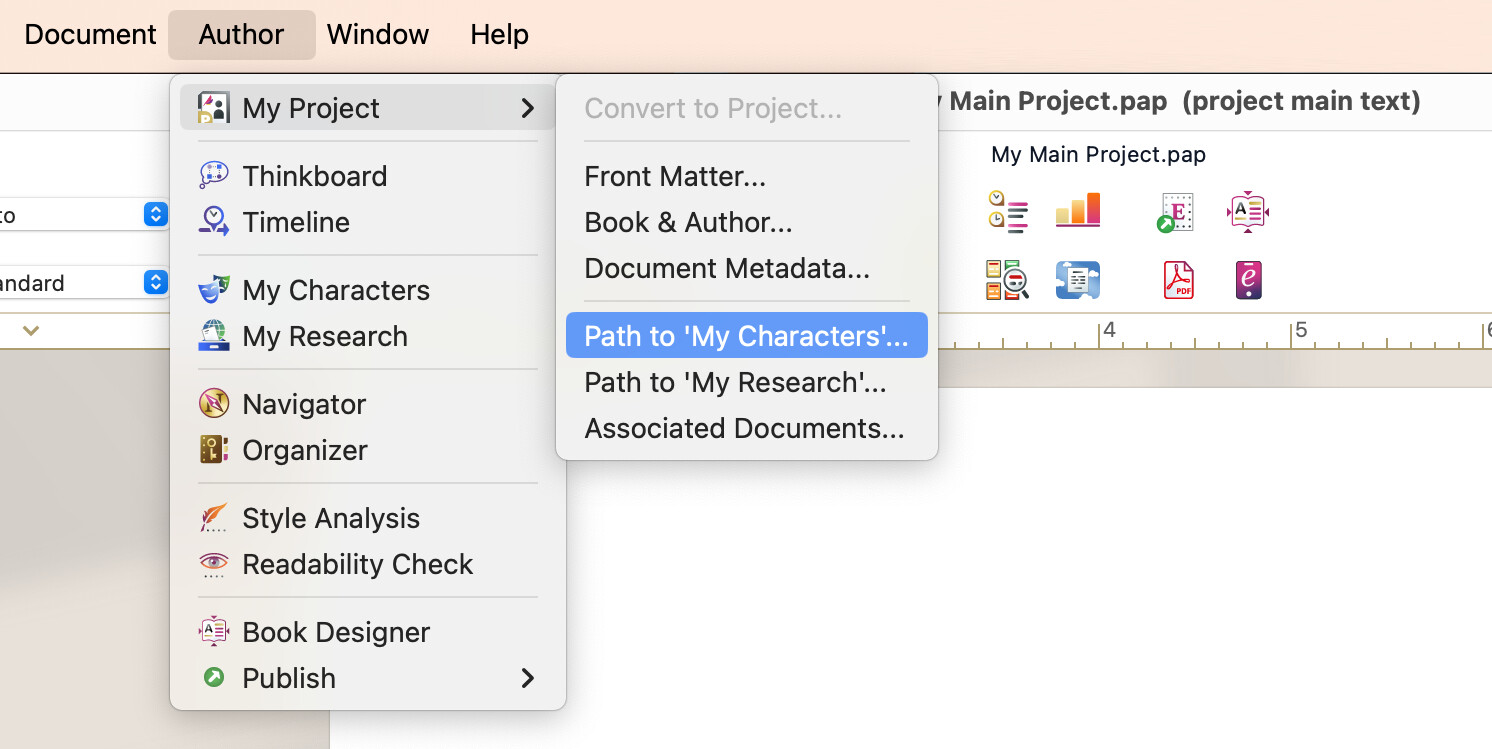
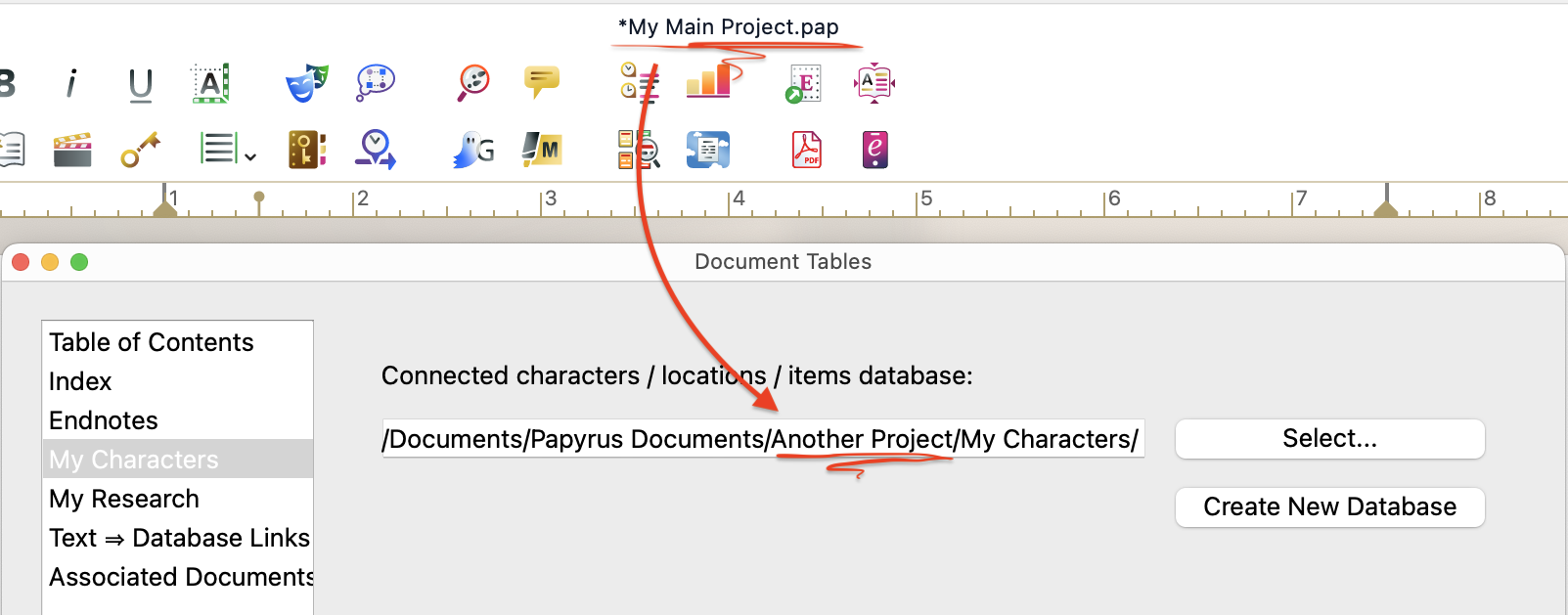
If you open one of your books, and go “Author” → “My Project” → “Path to My Characters…”, does it show a different project’s folder?

If they’re all connected to the same database, then only changes like moving or deleting of that one database affect your books, and the character info in the books’ own folders are not used.

I was trying to get the master list set up to use on this current story project, and then direct the others to it when I start writing them.

Yep, when you’ve got a series of books you’re working on, it makes sense to have one master database they all use! :bank:

So if I’ve got it right, here are the steps to connect other projects into your master list:

  1. Open a project you want to link the master database into.

  2. Go “Author” → “My Project” → “Path to My Characters”.

  3. Click “Select…”, and navigate to the master project’s folder.

:bulb: By default, your projects are saved in your computer’s “Documents” folder under “Papyrus Documents”.

  1. In the project folder, you’ll find “My Characters” folder. Open it, and choose “My Characters.pb”
  2. Click “Open”.

→ The project is now connected to your master list’s Character Database, and all the Character Sheets should show the same way they do in the master project. :magic_wand:

Here’s a quick video of the steps:

Let me know how it goes!

The database I want to build is for a series of stories I have in fandom, that require customized character sheets. I am building the database off of one story series (my fandom story series) from the ground up. It is in the customized character sheet design that I am having difficulty, with navigating the back in setup of the database and what sheet design (where the new entries are set to include on the back end, setting things to have drop down menus for choices and the like) and then getting that to work on the front in design part of what the Character sheets look like. I was getting the back end to do the drop down menus, but when I went to design those sheets in the front end those items weren’t showing up as sheet options to incorporate (in the pool of options).

Ah, I see!

You’ve run into a part of Papyrus where Character Sheets meet their predecessor, the Character Database. :card_file_box:

A bit of context:

Character Sheets are a newer feature. They use the same underlying character data, but are easier and nicer to work with than the older database.

Some of the more advanced database elements (like dropdown menus and radio buttons) belong to the legacy Character Database system, and don’t appear in Character Sheets. Those settings are still supported, but only apply when using the database in its older form.

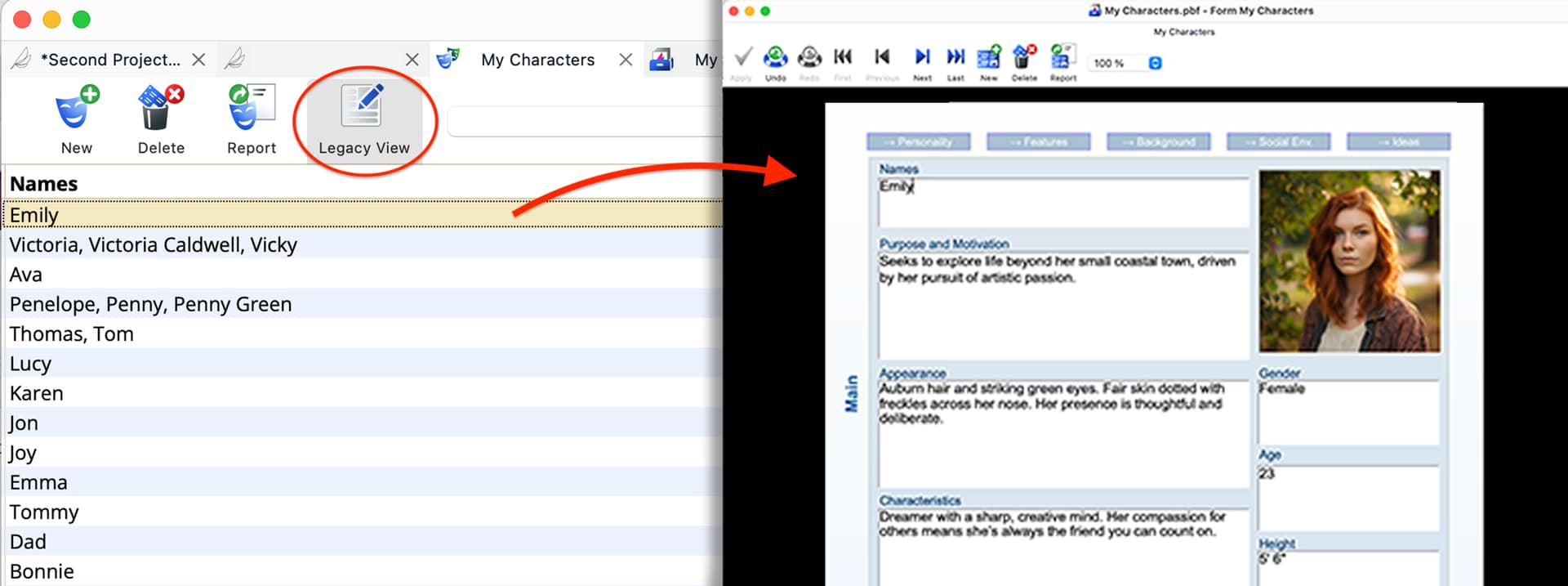
If you’re curious what that looks like, you can switch views:

  1. Open the Character Database
  2. Click “Legacy View” in the toolbar

:bulb: You can switch back to the Character Sheets from the same button.

This shows characters using the original database form layout. It’s mainly there to support existing projects and behaves a bit differently. For example, characters won’t show hover previews in the text, and instead open in their own tabs.

Still being kind of new to the software and menus and everything, I was using Google Gemini to help, considering I was doing this after hours.

It had me save all my scattered files (all the different story titles I had worked on in Papyrus Author) into one file on my desktop, I separated by story title in a main folder there. Then it had me delete the three folders in the Documents folder to force a restart of the program,

Create a new project with the story I was making this database from (doing a Harry Potter fan story, so making a database other Harry Potter fan stories can link to so I don’t have to rebuild).

Then because its a Harry Potter database, its got customized entries, so I was having to go into both of the back end Character Database sections, the field properties, andwhere you name the section, and then you go make sure it’s added to the sheet design and active, the edit entry form, both under the Database tab.

Then, Gemini was trying to get me to set things up in the Database tab part of things using the drop down menus, saving things under the Values tab for certain entries as Combobox or popup and listing the different options in the Values section for select-able values.

After those were all saved and organized on both of those, via the properties and the entry form editor, it had me going into the Character sheets part, and editing my sheets. This is where the problem came up. Anything that had a drop-down list option, didn’t show up in the pool of available options to put in the Character sheet.

When I would tell Gemini that those weren’t appearing in the available options, it would send me back through the back in database. I was circling this all night.

I think Gemini was trying to save me from typing so much in, with those drop -down menus.

Oh, Gemini was a bit too creative with its solution there, and ended up mixing in some of the database features in with the Character Sheets. :face_with_spiral_eyes:

Do you have a version of your characters before these changes? If you’ve got questions, you can send the database over in a private message, and I can take a look!

I didn’t actually make the character lists yet, it was just getting the categories set up for what was needed, and getting it functional.

I will play around with it today, see what it does, and send you the database as I set some characters in it, so you can see what its doing, if it was Gemini that was just causing the confusion or what.

1 Like