I face a big problem, the icon in the toolbar for left-aligned, right-aligned, or centered paragraphs is missing, and I cannot find it in the preferences for the toolbars, so I cannot add it. How to find this icon, I’m lost without it. Tried to reinstall Papyrus, but it didn’t help. I find it in the German version of Papyrus though. Maybe someone knows how to fix it?
(I should add that I use Papyrus 12.04 on Windows 11)
Hi!
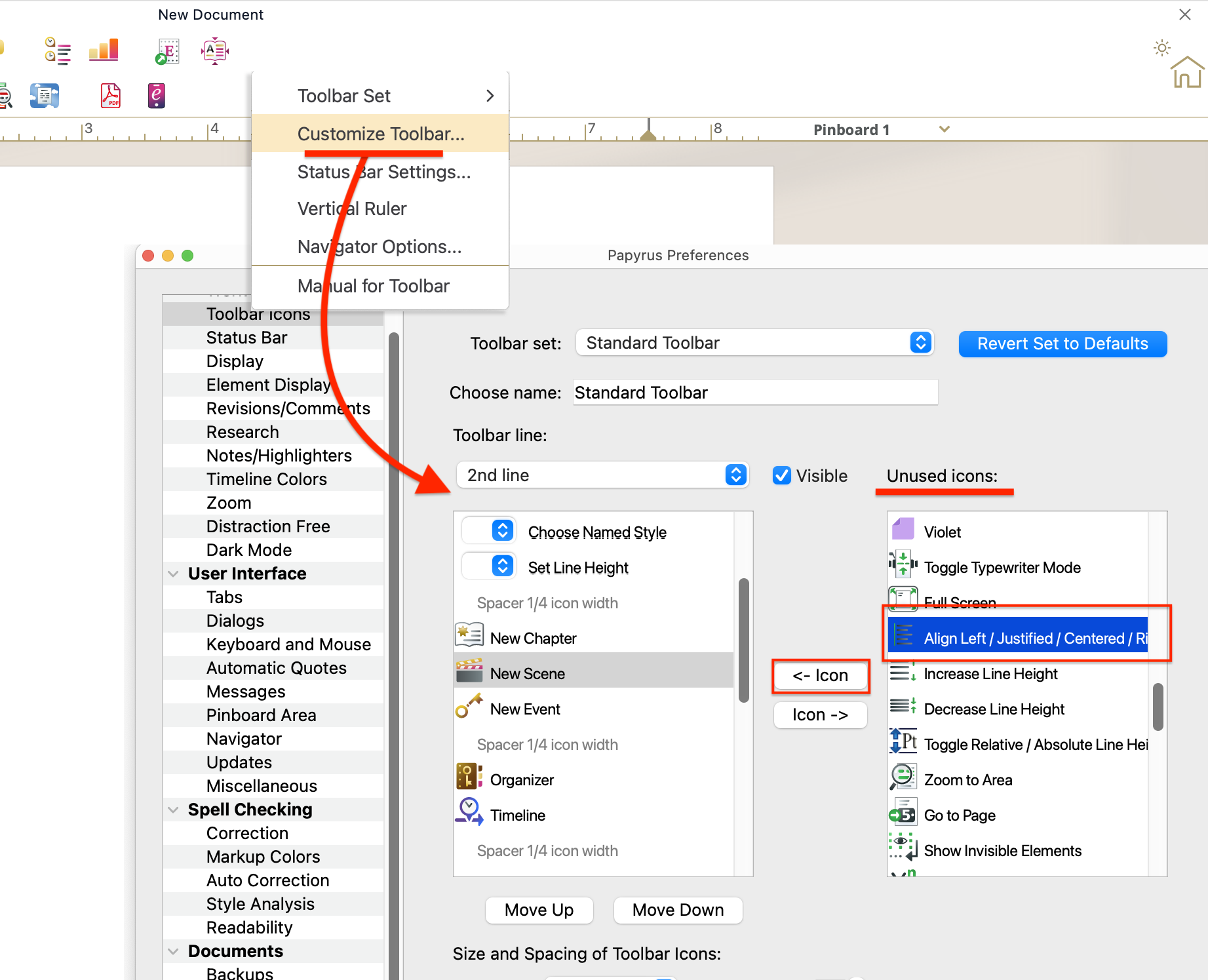
Maybe the icon’s been replaced or moved if you’ve brought in another icon in its place. It’s an easy fix, here’s how to add it back:
- Right-click the toolbar
- Choose Customize Toolbar…
- In the “Unused icons” list, find Align Left / Justified / Centered / Right
- Select it and click the ← Icon button to move it into the toolbar
It should look something like this:
Thank-you Sam