Hello all, I really need some reassuring help. I bought a new computer and I want to move all of my Papyrus 12 files to the new computer. I looked it up a little and basically was told to grab all of my Papyrus folder in File Explorer using *.pap, copying them into a folder, saving that folder to the cloud. Then on the new computer, opening that cloud drive, and moving the files back on to the pc. Which was all easy enough, but now when I look at the My Files tab within Papyrus 12, there are literally 400 plus files with no projects showing as books. It’s like they are all now loose sheets of paper instead of a cohesive file. Anything anyone can help me with would be appreciated. I am not the most tech savvy of people so this is harder than I would like to admit, even though it seems like it should be simple.
Yep, you’ve got the right idea for migrating your books! Just one small tweak, and your projects carry over, instead of loose sheets of paper. 
The .pap files have your text, mind maps, and timeline, but a Papyrus project can also include backups, pictures, databases, and other files to organize your files into books. 
The easiest way to bring everything across is to go back to the old computer and copy the entire Papyrus Documents folder from your computer’s Documents folder. If you’ve saved projects in other locations, copy those complete project folders as well.
Papyrus normally creates a folder for each project and keeps all of its related files together inside it. One of those is the .papj file, that tells Papyrus which files belong to that project and how they fit together:
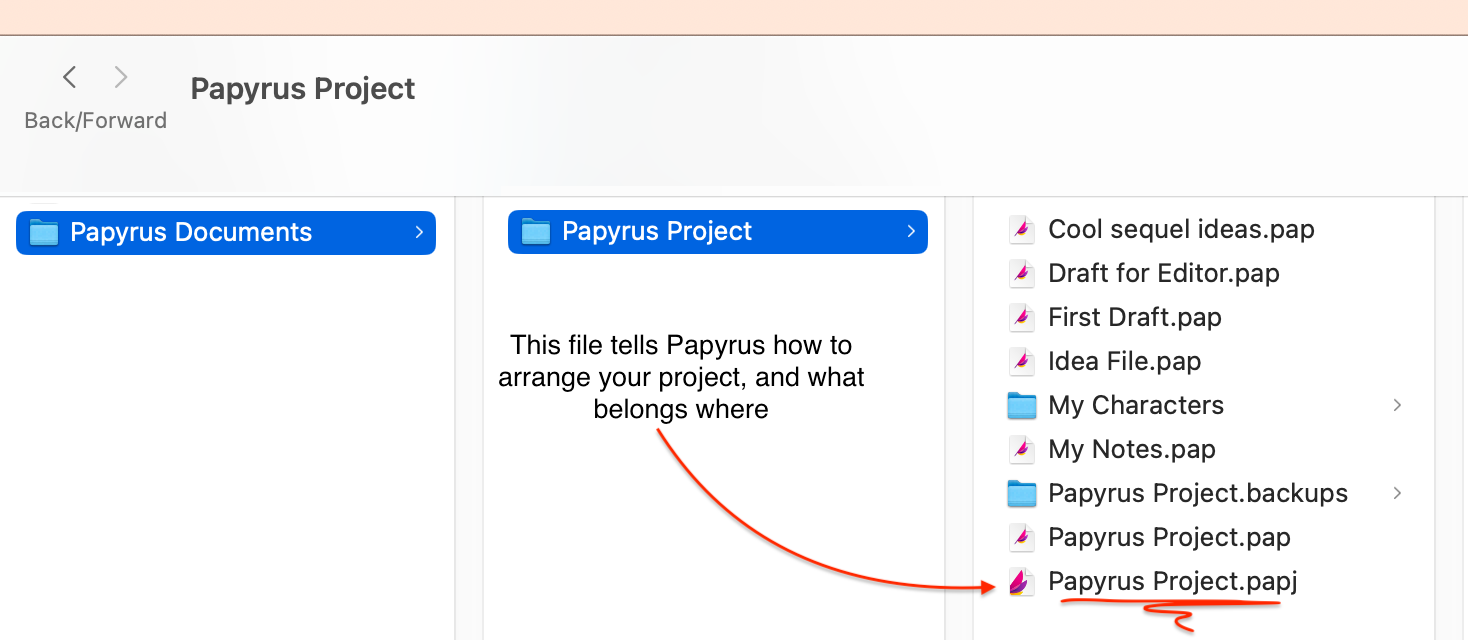
Your organized books are still there, just copy the complete book folders from the old computer, and you can pick up right where you left off. 
Have fun!