Probably a stupid question and if I searched enough I’d probably find out how if it’s possible but it’s been a long week…
Is there a way I can just save one copy on top of each other every time, rather than a new copy all the time, so I end up with millions of saved files?
Papyrus normally works with just one main file, and then creates safety backups in your Backups folder.
Those backups shouldn’t show up on your Start Screen or in your recent documents, so if you’re seeing a whole bunch of copies of the same project, there’s something unusual going on.
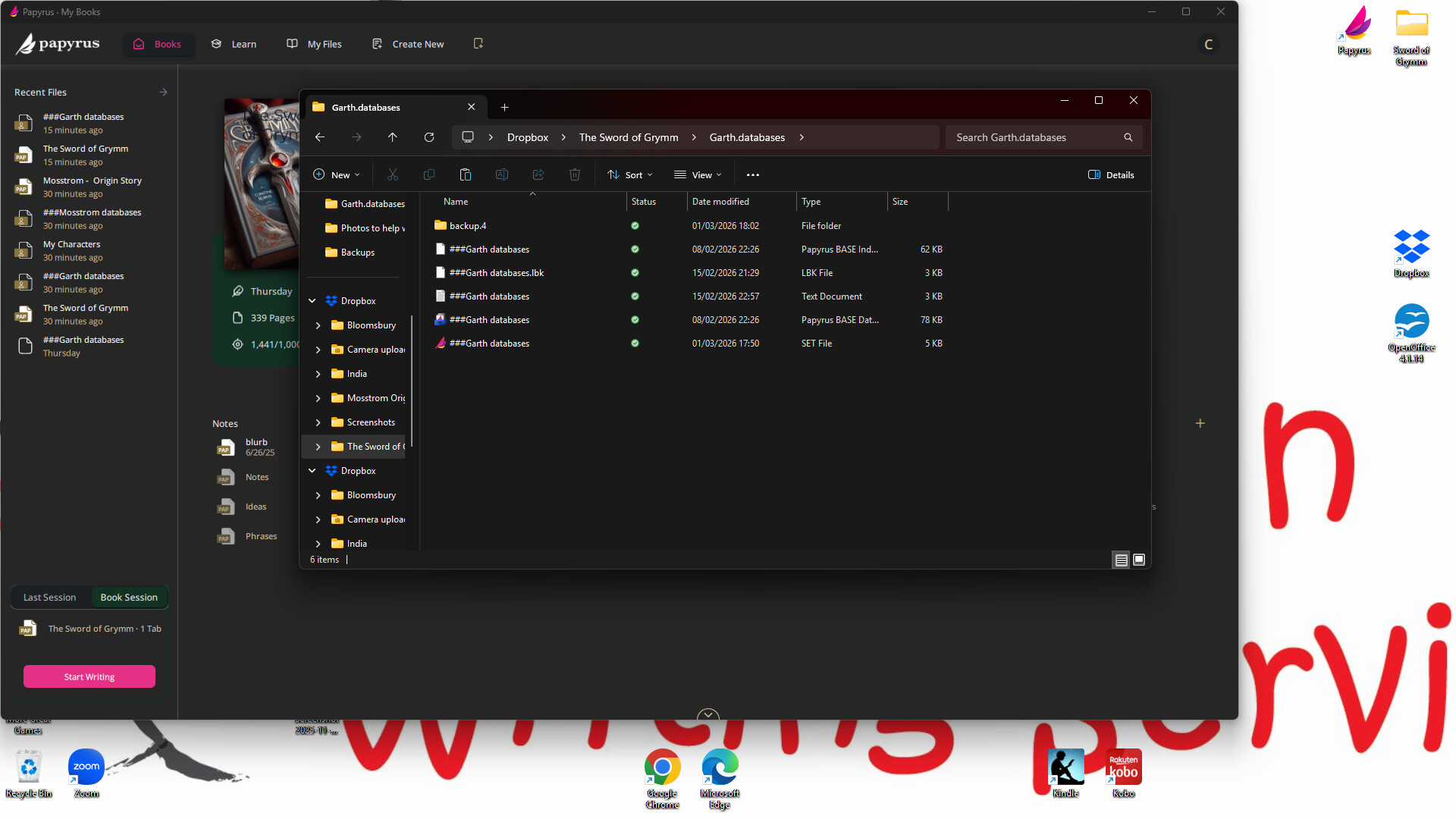
Can you grab a screenshot of what the folder looks like on your computer?
I’m wondering if the files are saved in the same location with different names, or separate places, but same name.
Also, are you working off a cloud folder like OneDrive? I’m wondering if your computer is losing connection to your cloud, and Papyrus doesn’t see that there’s a project already, so it makes a new one…
I save to drop box and when I look in the folders more backup folders keep appearing each time I finish working and shut it down.
I must have the settings somehow that they save separately. I just want one copy saved that saves in the same doc every time. Not millions of safety backups every so often as I go along, or if it does a safety backup can it save it to the same doc/file/folder rather than creating a new one?
As sometimes when I open papyrus to start writing, the database isn’t automatically there and so I have to go looking for it and have to open several million files to find the right one.
It saves it as a papyrus base index file and a lbk file and a text document.
I am easily confused and so many files is frustrating.
The files having “###” in front of their names is unusual. It could be that they weren’t fully saved or synced at the exact moment the screenshot was taken.
Do the files always keep the “###” in front of their names, or has it disappeared if you check now?
If they stay in a temporary state, that could explain what’s happening.
When Papyrus closes a project, it updates all the linked project files at once. If Dropbox steps in right at that moment and briefly renames or locks a file, Papyrus may not see the expected filename anymore.
From its perspective, the file is suddenly “missing,” so it creates a fresh one. That would also explain why you need to re-link the database afterward.
One more thing I noticed in your screenshot: Dropbox appears twice in the navigation panel on the left. Is that new?
Could you check in the Dropbox app, that you’re only signed in with one account, and that there’s no error messages about not having synced all the files.
I’ll try to recreate this on my computer as well.
Thanks for sticking with this. We’ll figure it out!
Hi Sam, the ### are always there, but looking at the two lots of files.
I’ve realised that sometimes I open drop box with the icon on my desktop and sometimes through the file explorer. Do you think that it is duplicating everything or is it all saving to the same place in the end?
Am I confusing things? Though it is the same folders in each one.
As you can see by my previous photo it is saving the files multiple times and it takes me a while to find the latest correct one.
Opening Dropbox from the desktop icon or through File Explorer should still point to the same Dropbox folder, so I don’t think that part is creating a second set of files.
I think the problem is with Dropbox not updating the files correctly, and that’s why there’s extra set of them with “###” in their names.
Let’s start with the easiest steps: I found a short guide that suggests restarting the Dropbox app when sync behaves strangely.
Dropbox may ask you to log in again, so it’s a good idea to have your Dropbox email and password ready before doing this.
The steps are:
Click the Dropbox icon near the clock (taskbar on Windows).




 Dropbox may ask you to log in again, so it’s a good idea to have your Dropbox email and password ready before doing this.